Statement Level Late Fees Vs. Invoice Level Late Fees
SedonaOffice allows for two different types of late fees. These are statement-level late fees, which are calculated for all past due invoices on the customer, and invoice-level late fees, which are calculated per invoice.
If a customer has only one past due invoice, then the amount of the statement-level late fee and invoice-level late fee would be similar. But if the customer has more than one past due invoice, the statement late fee will be greater than the invoice late fee because the statement late fee is calculated based on all past due invoices combined, and the invoice late fee is calculated based on only one invoice. Since these two values are not the same and are not interchangeable, they each have their own fields in SedonaOffice. Statement-level late fees do not show in invoice-level late fee fields, and vice versa.
Statement-level late fees display on statements and within the statement detail section of some invoice forms. Invoice-level late fees show below the total due on some invoice forms.
Note – If you have selected to show late fees on your printed invoice, then the invoice-level late fee will display below the total due, unless you have selected to show statement detail. Showing statement detail will instead pull the customer’s statement information, including the statement-level late fee. The good news is that statement-level late fee fields and invoice-level late fee fields look very different, so it is easy to tell at a glance which type of field is being displayed.
Example of an invoice printed with statement detail, displaying the statement-level late fee:

Example of the same invoice above printed without statement detail, displaying an invoice-level late fee:
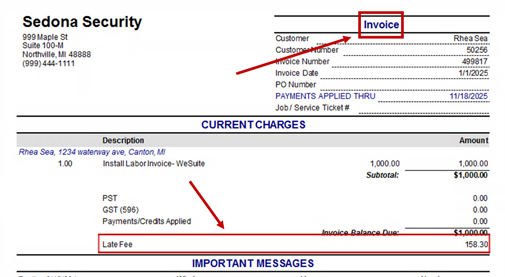
It is recommended to use either statement-level late fees or invoice-level late fees, but not both. For multiple reasons, the statement-level late fee amount and the combined total of all invoice-level late fees will almost never be the same, and this might be confusing for the customer receiving the late fees.
Sometimes a customer does not qualify for a late fee at the time statements are run, but does qualify shortly after. In this case, their invoice statement detail will show no late fee, since they did not qualify for one when the statement-level late fees were last calculated. If you need a late fee to display for this customer, you have two options:
- Re-run the statement-level late fee calculation. The newly calculated statement-level late fee will then show in the statement detail section of the invoice. Remember that recalculating statement-level late fees affects all customers, so unrelated customers will see their late values change accordingly. If you do not want the late fees on other customers to be affected, do not choose this option. For step-by-step instructions on this option, use the help doc referenced here: Help Doc "Adding a Statement Level Late Fee."
- Calculate an invoice-level late fee for this customer. The newly calculated invoice level late fee will then show below the total due on the invoice. Remember that you cannot include statement detail on the invoice if you want the invoice-level late fee to display. For step-by-step instructions on this option, use the help doc referenced here: Help Doc "Adding an Invoice-Level Late Fee."